APRS presentation by Scott Sheppard, KJ4ZZB
Scott Sheppard (KJ4ZZB) gave a presentation on APRS — the Automatic Packet Reporting System — at the monthly DeKalb ARES meeting. A primer on what APRS is, where it came from, what it can do beyond position tracking (messaging, telemetry, bulletins, automated bots), and why it remains relevant infrastructure for amateur emergency communications four decades after its creation.
What APRS is
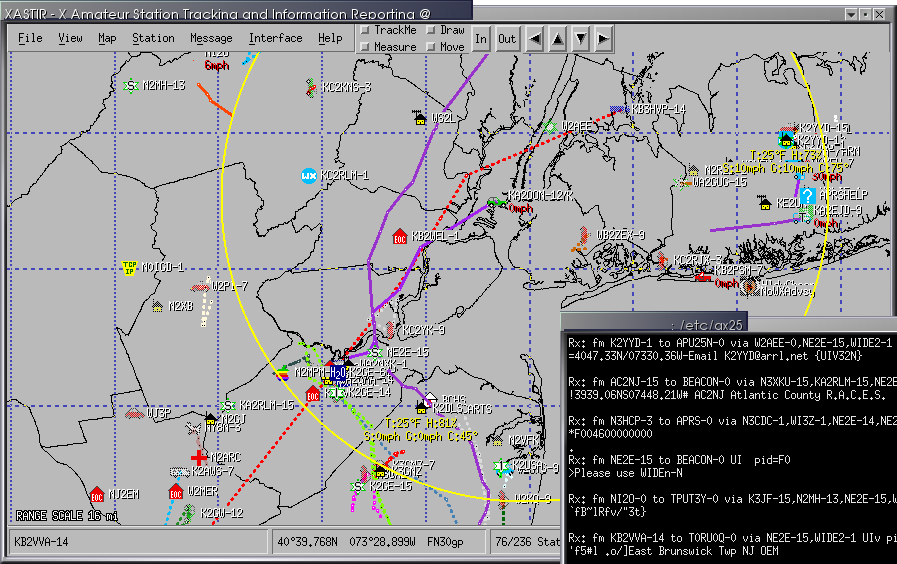
APRS — the Automatic Packet Reporting System — is a real-time local-area digital network for amateur radio. Stations beacon their position, status, weather, telemetry, or short messages over RF in standardized packets, and any nearby station (or internet gateway) can receive, plot, and re-route those packets. The result, viewed on a map application, is a live picture of every participating station in the area.
Most casual exposure to APRS is via aprs.fi, the public global website that visualizes every APRS packet ingested worldwide. But “things on a map” undersells what APRS actually is — it’s a general-purpose tactical data network that the position- tracking happens to be the most visible feature of.
A surprisingly old idea — and one person’s vision
APRS was created by Bob Bruninga, WB4APR — for many years a senior research engineer at the U.S. Naval Academy in Annapolis. He prototyped the system in the late 1980s and demonstrated the first public version in 1992.
His original framing matters. Bruninga didn’t see APRS as a “position tracker” — he saw it as a two-way local-area tactical network, distinct from traditional packet radio’s store-and-forward email model. Positions were just one of several report types he designed in. He even renamed the acronym at one point: it had been Automatic Position Reporting System and he revised it to Packet to emphasize the broader scope.
Bob became a Silent Key in February 2022, but the system he built has only grown since. APRS today carries traffic across amateur HF, VHF, satellite (the ISS digipeater NA1SS), and a worldwide internet backbone — and it’s the position-data backbone behind a meaningful share of public-service event support, search- and-rescue operations, and high-altitude balloon flights every year.
What APRS actually does
Beyond position beacons, the protocol carries:
Messaging
APRS supports short text messages between stations, with delivery acknowledgment and automatic retry. Address a message to another station’s callsign, type up to ~67 characters, and the system handles delivery — over RF where possible, falling back to the APRS-IS internet network if the destination is reachable that way. Group messaging works too, via tactical callsigns shared among a team.
This is the layer that gets used during public-service events for “send me to Mile 7” or “runner #1234 picked up” traffic — exactly the use case that came up during DKARES’s March 21 county coverage drill.
Telemetry
Every APRS station can publish up to 5 analog channels plus 8 binary status bits at a configurable cadence. The protocol includes header packets that name the channels and define their units, so a remote receiver knows what a number means without out- of-band coordination.
DKARES uses this for the W4BOC-1 backup-power monitor on Stone Mountain — battery voltage, current, state-of-charge, temperature, and charger output current as analog channels, plus eight bits covering BMS health, mains presence, and SoC thresholds. The full telemetry is visible to anyone on the W4BOC-1 aprs.fi station page — see the W4BOC-1 deployment entry for the full setup.
Weather data
APRS has built-in weather-station packet types. Personal weather stations connected to APRS gear automatically beacon temperature, wind, pressure, humidity, and rainfall — feeding the global CWOP network that the National Weather Service ingests for short-term forecasting.
Bulletins and announcements
Bulletin packets are one-to-many announcements addressed to
BLN0–BLN9. ARES groups use them to push net activations, drill
notices, or weather-spotter callouts to every station in a region
in a single transmission.
Objects and items
A station can place a named marker on the map at any coordinates — useful for tagging an aid station, a hazard, a checkpoint, or a temporary repeater during an event. Other stations see it appear on their map view with whatever icon and short label the originator chose.
Bots and automated services
A small ecosystem of automated services — bots, in modern parlance — listens to APRS messages and responds. Some of the better-known ones:
| Bot | Sends a message | …gets back |
|---|---|---|
| EMAIL-2 | EMAIL-2 :addr@example.com message body | Sends an email to the address |
| WHO-IS | WHO-IS W4XXX | Callsign data from QRZ-style sources |
| WXBOT | WXBOT zip or WXBOT city,ST | Current conditions + short forecast |
| APRSAT | APRSAT grid | Next pass of amateur satellites overhead |
| SMS | SMS @1234567890 message | Delivers as SMS to the registered number (NA7Q’s gateway, opt-in required at both ends — replaced the older SMSGTE service which shut down in 2023 due to spam abuse) |
These are accessible from any APRS station, anywhere on the network, by sending a regular APRS message — no separate accounts, no apps to install. The lineup evolves, though: bots come online and retire over time as their operators’ situations change. The canonical reference for what’s currently running is aprs.wiki.
How it travels
APRS operates on an unusual two-tier infrastructure:
- RF — In North America, the standard is 144.390 MHz, 1200- baud AFSK packet (Bell 202). Other regions use 144.800 (Europe), 144.640 (Japan), 144.575 (Australia/NZ). HF APRS lives near 30 m for cross-continent traffic. ISS carries an APRS digipeater on 145.825 MHz.
- APRS-IS — A worldwide internet backbone that ingests every packet handed up by an iGate (a station that bridges RF to IP). Once on APRS-IS, every other iGate can re-radiate it on RF if configured to.
- Digipeaters — RF stations that listen for APRS packets and re-transmit them, extending range over a region.
- iGates — RF stations also connected to the public internet that copy packets between RF and APRS-IS in one or both directions.
DKARES operates W4BOC-1 as a permanent digipeater + iGate on Stone Mountain (~106 mi coverage radius per APRS.fi), plus deployable portable iGates carried by members during drills.
Software ecosystem
A non-exhaustive sample of clients and tools members use:
- aprs.fi — the global web tracker (Hessu, OH7LZB)
- APRSdroid — Android client
- PinPoint APRS — Windows client (popular with DKARES members)
- YAAC — cross-platform Java client + iGate
- Xastir — Unix/macOS classic, very featureful
- DireWolf — software TNC and iGate (Linux/Windows)
- Graywolf — modern all-in-one APRS station (modem + digipeater + iGate + web UI), see the Graywolf activity entry for detail
- APRSIS32 — long-running Windows client
Why it earns a permanent place in EmComm
For DeKalb ARES specifically, APRS gives us:
- Live operational picture during deployments. During the marathon, every SAG, PACE, and MOTO unit beaconing onto a map at Net Control means dispatch is visual, not just verbal.
- A robust messaging layer that’s not voice-or-nothing. APRS text messages are short but reliable, ACKed, and survive conditions where voice is fighting noise.
- Quiet, automatic infrastructure monitoring. The W4BOC-1 battery telemetry is a simple, public, always-on indicator of whether the rack is healthy — visible to any member without any privileged credentials.
- A path to internet-independent operation. RF-only APRS works if cell, fiber, and Starlink all fail. We’ve practiced this in drills.
Forty years on from Bob Bruninga’s original vision, APRS is still exactly what he framed it as: two-way local-area tactical data, visible on a map, available to every operator on the network.
Where to learn more
- Bob Bruninga’s original APRS site — aprs.org (preserved)
- Live worldwide APRS map — aprs.fi
- The APRS protocol spec (1.0.1) — aprs.org/doc/APRS101.PDF
- DKARES W4BOC-1 station page — aprs.fi/info/a/W4BOC-1